|
|
Windows98 Easter eggs
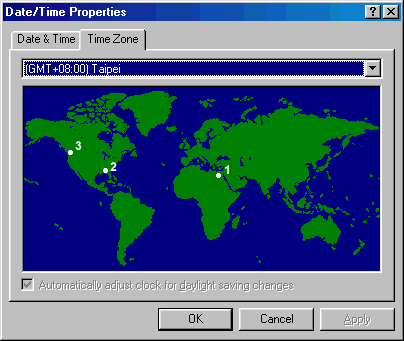
Double-click on the clock in the tray to open the Date/Time properties dialog box.
Windows98 Team Members
Select the Time Zone tab.
While holding down the Ctrl key, click and drag from
Memphis, Egypt (point 1) to Memphis, Tennessee (point 2).Let up the mouse.
There will be no visual indication that anything has happened.
Repeat the click and drag again (while holding down Ctrl),
this time from Memphis, Tennessee (point 2) to Redmond, Washington (point 3).
A nice credits screen (complete with video and music) is displayed.
Just drag from point 1 to point 2 to point 3 while holding down the Ctrl key
Click here to see the pics taken...Pics